• Greetings, Agents! Welcome to the The Division Forums. It looks like you're looking forward to Tom Clancy's The Division 3, but haven't created an account yet. Why not take a minute to register for your own free account now? As a member you get free access to all of our forums and posts plus the ability to post your own messages, communicate directly with other members and much more.

PC Some PC key binding questions

Status
Not open for further replies.

capella6707

New member
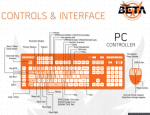
My understanding is that on the PC to do one of the emote actions (clap, jumping jacks, etc) I hit Tab. That doesn't work for me. The zoom works when I'm aiming with a weapon and I hit Tab, but I can't do an emote action.

Also, the chat window. The Enter key is supposed to open the chat window, but it's not.

Could someone clear this up for me?

Thanks

 
TAB has an option for "Social Interaction" but I don't believe its set up as default perhaps or its very situationally sensitive. When aiming it zoom's, when close to an enemy it activates your melee ... I'm guessing as long as you are out of combat and are not aiming a weapon it "should" activate one of the social animations.

Enter/Return key is default to open chat window. Check you haven't disabled chat in options also look in the options and perhaps restore your controls to Default status and see from there. 

Key mapping attached. 

PC_Controller.png

 
If you have a bit of disposable income, grab a 4x6 or 5x6 programmable keypad (P.I. Engineering makes my favorites, like their XK-80, but they do get expensive if you can't bill your job for them lol), or something less expensive like a Razer Orbweaver/Tartarus. Swap your mouse for a Razer Naga as well and you've got some serious control.

You wouldn't type your thesis with an xbox controller, why game with a keyboard?

 
Status
Not open for further replies.

Advertisements

Back
Top